
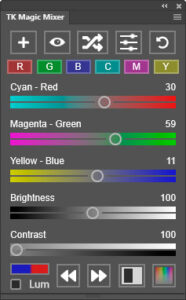
 Tony Kuyper's TK Magic Mixer plugin primarily provides unique ways to experiment with black-and-white using the Photoshop Channel Mixer adjustment. It uses the Channel Mixer's "Monochrome" option to achieve its results. Color luminosity variation can also be explored with the plugin using Luminosity blend mode. You can get the plugin on the Tutorials & Plugins page.
Features include:
- One-click creation of a Channel Mixer adjustment layer with neutral settings that serve as an ideal starting point for creative exploration.
- Easily create Red, Green, Blue, Cyan, Magenta, and Yellow channels for seeing how the image looks filtered through specific channels.
- A "Randomize" button to quickly generate image variations based on different channel combinations, brightness, and contrast.
- Smart sliders that automatically adjust to keep image brightness constant.
- An independent Brightness slider, which allows brightness and color to be adjusted independently and simultaneously.
- Default user interface uses colored sliders to help predict the effect on the image (pulling a slider towards a specific color makes that color lighter in the image).
- An optional interface that matches the sliders on the Channel Mixer's Properties panel.
- A unique contrast adjustment that increases contrast in the image by enhancing contrast between the different channels (Red, Green, and Blue).
- Options to save, load, and delete presets in order to allow reuse of particularly useful Channel Mixer settings.
- Effective and unique possibilities for converting color images to black and white using the randomize option or by manually adjusting the sliders.
- The option to use Luminosity blend mode to adjust color brightness based on color channels instead of converting the image to black and white.
- An optional Color Luminosity adjustment for fine-tuning the plugin's effect.
- Optional toning via an added Hue/Saturation adjustment layer.
- 8-bit, 16-bit, and 32-bit images supported for most functions.
- Easily cycle through different history states using the Step Backward and Step Forward buttons.
- The ability to back up and restore user data so that presets and preferred settings are not lost in case of a computer crash.
- Tooltips available on all elements as a quick reminder of what each button, slider, or checkbox does.
The plugin is distributed in a download folder with includes installation instructions and a complete button-by-button written instructions manual. Photoshop 2022 (version 23.3.0) or Photoshop Beta is required to install and use it. The image below shows the plugin and labels the buttons and other elements.

Use the plugin's fly-out menu in the upper right corner to access additional options and resources.

The video below by Dave Kelly provides a quick overview of how this plugin works.
For a complete look at all the features in the TK Magic Mixer plugin, including workflow suggestions, download the free instructions manual.
How to get the plugin
The TK Magic Mixer plugin is available on the Tutorials & Plugins page.