The Tony Kuyper Interview
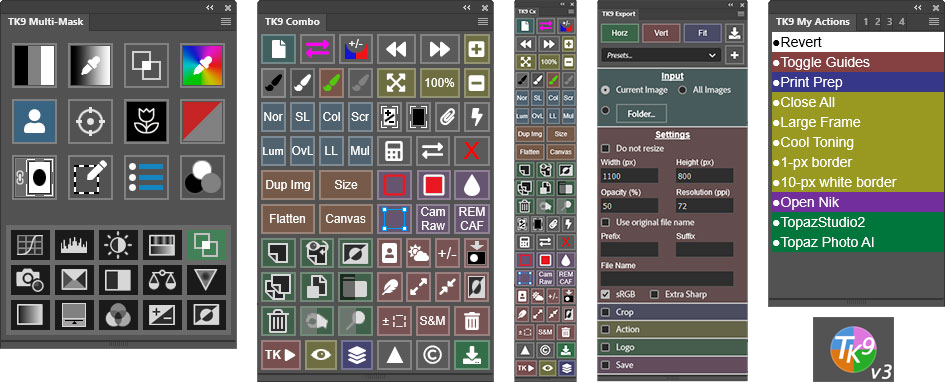
In my courses Luminosity Masks: Basic and Luminosity Masks: Advanced the masks and concepts have their origins back in 2006 when Tony Kuyper published a tutorial on how to make them, which included an action set to do the manual labor of generating the different series of masks. I had a chance to ask Tony about the evolution of his Photoshop techniques from these early actions to the increasingly sophisticated plugins he has developed since then. The TK9 version 3 plugin is the latest iteration and is featured in my new courses. Below is a summary of our conversation.
Sean: Luminosity masks were possible in Photoshop BEFORE you published your 2006 article. So why do you think that article changed the perspective of many photographers about using them?
Tony: It's true, I didn't invent luminosity masks. They've been possible in Photoshop for a long time, though it's no easy task to make them on the fly. The article's innovation was that it provided a standardized method to make luminosity masks and even provided a downloadable action set to generate them. The series of masks (Lights, Darks, and Midtones) outlined in the article were an important key to providing enough masks to properly isolate different tonal ranges in the image. Once photographers had the actions to make the masks, it was relatively easy to find ways to add them to their workflow, and, of course, they quickly saw how useful they were. The article provided a practical method for generating luminosity masks and this then made them accessible to the larger photographic community.
Sean: When you first started working with luminosity masks, did you foresee that they would become such a widely used tool?
Tony: No, I didn't. I knew I was getting good results and liked using them, but I'm a bit of a Photoshop nerd. I figured they would be too complicated for most photographers or that the degree of manipulation they provided would be frowned upon. What helped the masks gain traction was when others started blogging and making videos using the same series of masks outlined in the tutorial. That not only got the word out about luminosity masks, but it also helped loosen up attitudes towards creative processing with Photoshop. So, while I didn't foresee where these techniques would go, I'm happy they eventually found their way into the post-processing mainstream and made a difference.
Sean: TK9 v3 is considerably more complex and functional than anything you did before. What were some of the challenges you encountered in getting from those original actions to today's plugin?
Tony: Oh my, where to begin? It's actually a never-ending parade of challenges. For example, Adobe completely changed the architecture for plugins three times in 10 years. Each of these required a complete rewrite of the TK panel to fit the new coding format. I also didn't know JavaScript when I started and had to learn it while developing the different modules. The amount of code continues to increase (currently around 50,000 lines), and unexpected bugs routinely show up that need to be fixed. There's also the process of adding new features. This requires a lot of experimentation, coding, and testing to eventually get incorporated. The key point, I guess, is that I'm always working at the edge of what I'm capable of doing when it comes to coding plugins. Things are always changing, and I have to keep up.
Sean: It sounds somewhat stressful. Why do it?
Tony: Well, it's not all stress. When I started making plugins I quickly realized that making them is like photography for me. There's always room for improvement, and finding a way to get better at something can be fun and exciting. The right challenge sparks creativity and the results occasionally exceed expectations. Making a print or coding a plugin feels pretty much the same now. They both engage my creative side and are equally satisfying.
Sean: If you had to pick a couple of features from TK9 that you're most proud of, what would they be?
Tony: Color grading in the Multi-Mask module would be my top pick. It's the most complex feature in TK9 and is essentially a new type of adjustment layer for Photoshop. It uses a Curves adjustment layer to create its results, but it allows users to do things with Curves that would be impossible using Photoshop's Properties panel. After that, it's Edit Blend If. I never really understood Photoshop's Blend If function until I forced myself to code it into the panel, so that was a good learning experience. And this is one of those features that exceeded expectations. Edit Blend If in TK9 finally makes Photoshop's Blend If accessible to photographers, especially when compared to working inside Photoshop's Layer Styles dialog.
Sean: I'm a bit surprised you didn't mention luminosity masks.
Tony: Ah, good point. There's no question that luminosity masks are probably the primary reason photographers use TK9. So, yes, I'm still very proud of my contributions to luminosity masks and how they've influenced the panel and photography over the years. But coding them into the panel seems relatively easy now compared to Color Grading and Edit Blend If. The math and code in Color Grading and Edit Blend If are like nothing I've done before, so it was quite a challenge. I'm very happy with the way they turned out, although I'm not sure I could do it again.
Sean: Do you have thoughts about what's next for the TK plugins?
Tony: TK9 v3 feels somewhat mature at the moment. It's feature-rich relative to previous versions and there's not a lot of space for adding new things. But I can see maybe doing some small tweaks going forward. In the past year, I've also enjoyed making smaller panels with more focused functionality. Things like the Magic Mixer and Gen Fill. I think it would be fun to do more of these, and I have a few ideas. But I'm open to whatever comes along. I'm always surprised to discover new possibilities and look forward to seeing what else is out there.
You can get the TK9 v3 plugin for Photoshop and the Luminosity Mask Basic & Advanced courses on the Tutorials & Plugins page.